Quantum Cobra and Quantum Cobra 3.1: The UF Chart's Elite Signals
The main chart's Elite set is built around SmartFlow. The UF Chart has its own: the Quantum Cobra family. This guide covers Quantum Cobra, Quantum Cobra 3.1, and the Quantum Cobra Tally — what each checkbox draws, how the pieces relate, and where to find them.
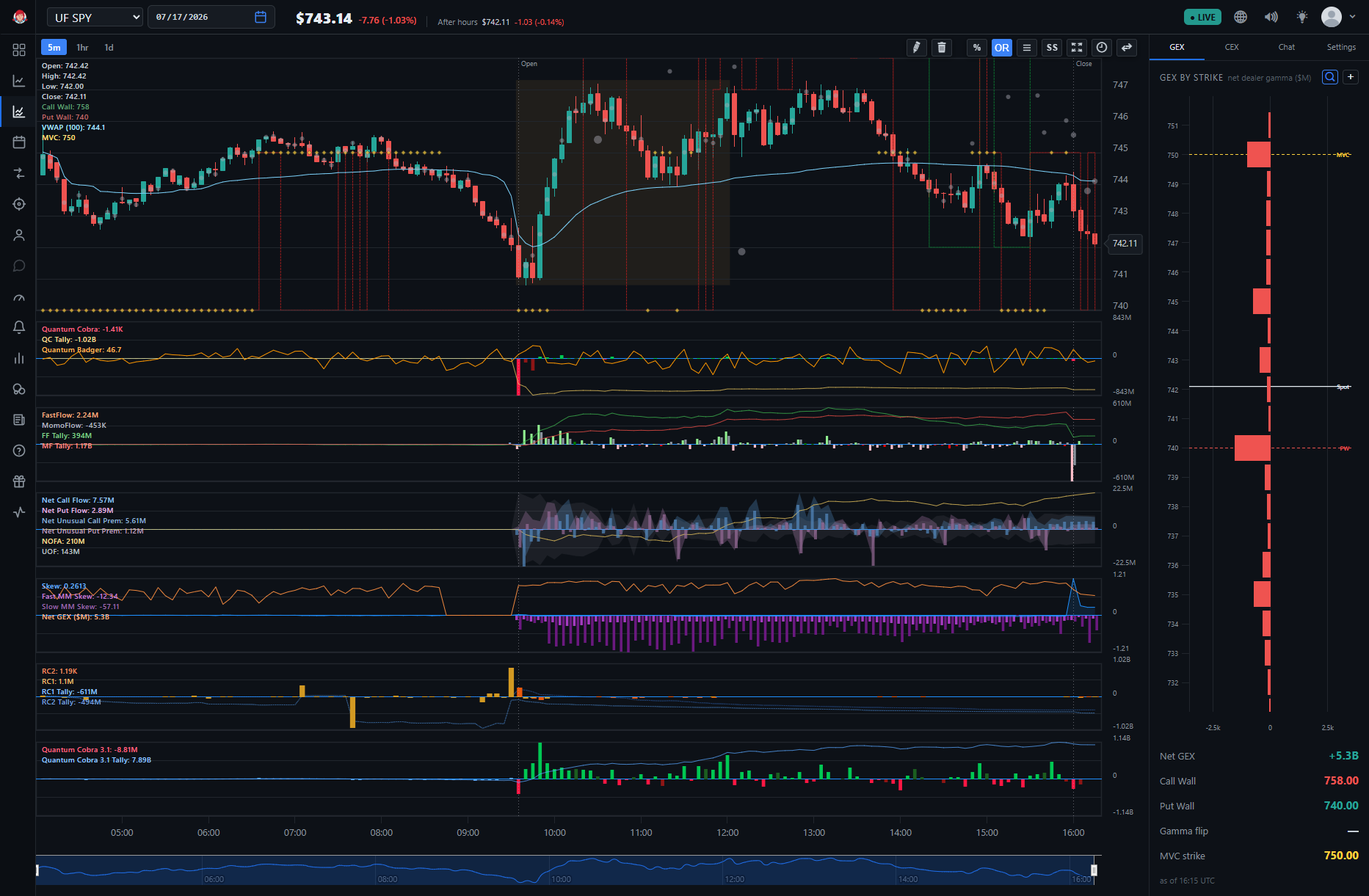
All of them are BigShort Elite indicators — they require the Elite subscription tier. If you're logged out, the app still shows the indicator names with a Subscribe to unlock option.
Quantum Cobra
Quantum Cobra is an Elite indicator exclusive to the UF Chart. On the chart it draws as directional bars, green for up and red for down — the same dual-shade convention as SmartFlow 3: a dark bar (dark green or dark red) means Quantum Cobra is not aligned with MomoFlow, a light bar (light green or light red) means it is aligned with MomoFlow. FastFlow doesn't factor into this convention at all — it's purely a Quantum Cobra/SF3-vs-MomoFlow read.
Quantum Badger is a separate Elite indicator that shares Quantum Cobra's pane, drawn as the orange line. Quantum Badger has no checkbox of its own — enabling Quantum Cobra turns Quantum Badger on with it, even though the two are distinct signals.
How to read it
There are two series to know:
- Quantum Cobra — the green/red directional bars, the live signal itself.
- Quantum Cobra Tally — a companion view of the same bars, not a separate indicator. Across BigShort's panes, a Tally is a running session total of its parent series — the cumulative session picture alongside the live read. The Tally has its own toggle in the UF Chart's Elite settings.
A significantly sized first Quantum Cobra bar of the day can offer a directional bias for the session.
An outsized Quantum Cobra bar — especially one running opposite the candle's own color — can also be read as an exhaustion signal, the same way traders read an outsized bar on regular SmartFlow 3 or FastFlow: a likely local top or bottom, not necessarily a full trend reversal.
Read Quantum Cobra in context: watch the bars and their Tally alongside price, Quantum Badger's orange line, and the UF Chart's other panes — rather than treating any single bar as a trigger on its own. Confluence is king.
Quantum Cobra 3.1
Quantum Cobra 3.1 is a second version of the signal with its own checkbox. Per BigShort developer Andrew, Quantum Cobra and Quantum Cobra 3.1 run different underlying algorithms, and both are UF (index-aggregate) reads — beyond that, the exact difference between the two isn't documented. Both remain available side by side, so you can draw either one, or both, and compare them on your own chart. (The main chart's SmartFlow follows the same two-versions pattern with SF3 and SF3.1.)
Where to Find Them
All three checkboxes live under ⚙️ Settings → BigShort Elite Indicators on the UF Chart (app.bigshort.com/uf/UFSPY): Quantum Cobra, Quantum Cobra 3.1, and Quantum Cobra Tally, alongside M2 RC1 + RC2.
The family is UF-only — it does not appear on the main chart, whose Elite set is instead built around SmartFlow 3 and SmartFlow 3.1. Since the UF Chart is index-wide, that also means Quantum Cobra is available on indexes like SPY and QQQ.
An Elite subscription is required to enable them; logged-out users see the names with a Subscribe to unlock option.
- Quantum Badger — the separate Elite indicator that shares Quantum Cobra's pane, drawn as the orange line
- Ultraflow (UF) Chart — the index-wide chart where the Cobra family lives
- SmartFlow 3 and SmartFlow 3.1 — the main chart's Elite flow signals