𖣨 Toby Crabel Tab
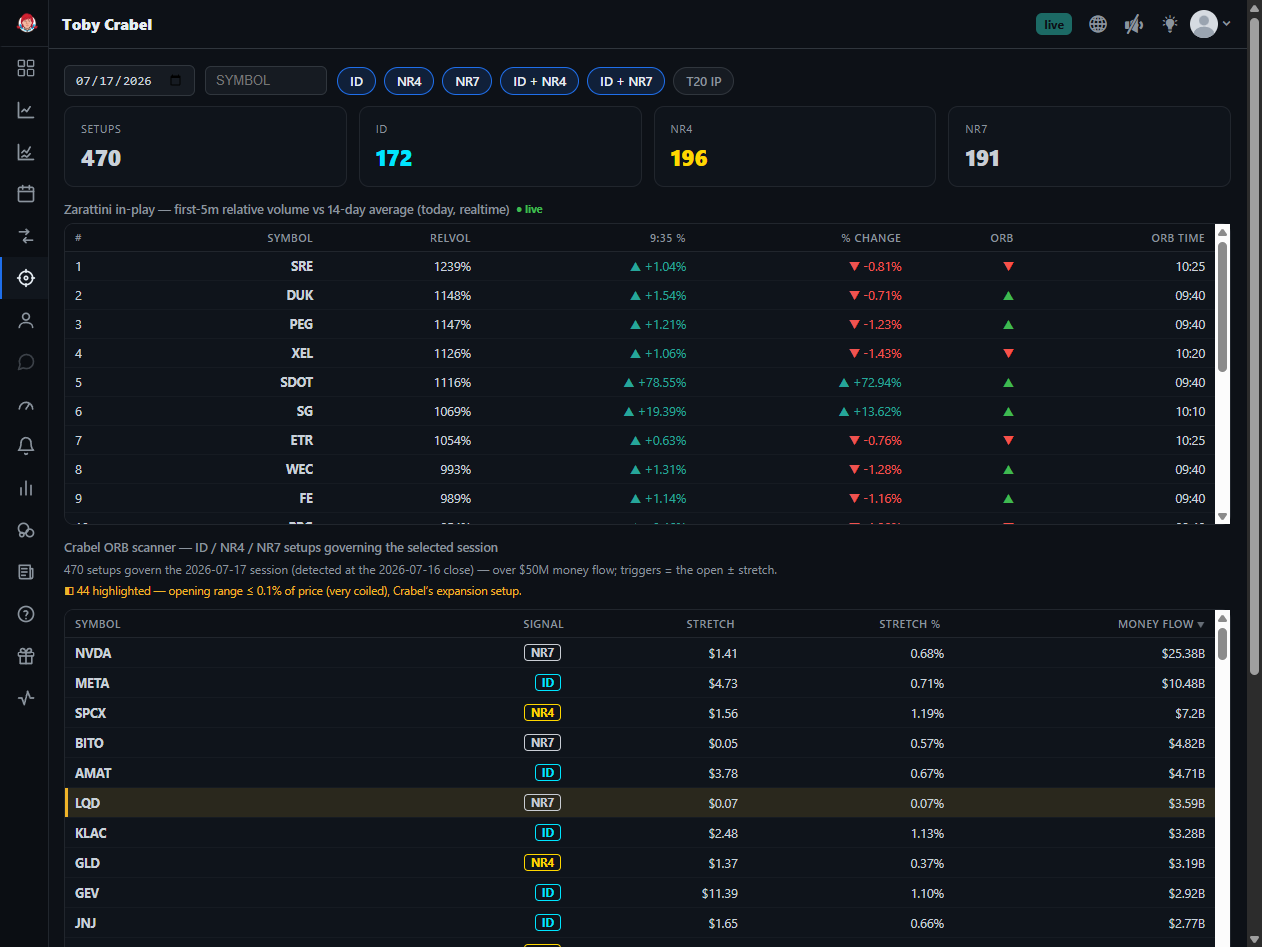
The Toby Crabel tab (app.bigshort.com/toby, nav Toby Crabel) is a volatility-contraction and opening-range-breakout scanner. It flags stocks that closed the prior session in one of Toby Crabel's classic low-range setups — the conditions that often precede an expansion move — and then tracks how each one behaves at the open using the Zarattini relative-volume methodology. Because the trades it surfaces are opening-range breakout (ORB) plays, you'll hear BigShort traders refer to it as the ORB scanner — that's the name this guide lives under.
The Setup Filters
Across the top of the tab you can filter by setup type. Each button shows a live count of how many names currently qualify (the IP SETUPS counts):
- ID — Inside Day: the entire day's range fits inside the prior day's range.
- NR4 — Narrowest Range in 4 days: today's range is the tightest of the last four sessions.
- NR7 — Narrowest Range in 7 days: the tightest range of the last seven sessions.
- ID + NR4 and ID + NR7 — combinations that require both an inside day and a narrow range, a higher-conviction contraction.
- T20 — the Zarattini Top-20 candidates, a top-20-style set of contraction candidates. After 9:35am ET, selecting T20 will show all the top 20 Zarattini candidates that also pass the Toby Crabel filters.
The idea behind all of these is the same: a period of unusually low volatility (a "coiled spring") frequently gives way to an expansion breakout the following session.
The Zarattini In-Play Screen
Below the filters sits the "Zarattini in-play — first-5m relative volume vs 14-day average" table. This is the real-time confirmation layer: it ranks symbols by how much volume they are trading in the opening minutes relative to their own 14-day average, so you can see which setups are actually attracting participation today.
The in-play table columns:
| Column | Meaning |
|---|---|
| # | Rank |
| SYMBOL | Ticker |
| RELVOL | Opening relative volume vs the 14-day average (shown as a percentage) |
| 9:35 % | The first-5-minute price move |
| % CHANGE | The move on the day |
| ORB | Opening-range-breakout direction (▲ up / ▼ down) |
| ORB TIME | The time the breakout occurred |
A high RELVOL reading on a name that also has a valid contraction setup is the combination the tab is designed to surface.
The Setups Table
A second table lists the qualifying setups with the columns Symbol · Signal · Stretch · Stretch % · Money Flow. Stretch is the trigger distance from the open (the Crabel "stretch" — the amount price must move to confirm the breakout), and Money Flow is sortable so you can rank setups by the flow behind them.
On the Chart: Toby Crabel Opening-Range Mode
The Toby Crabel logic is also available directly on the main chart. Right-click (or long-press) the OR (opening-range) toolbar button and choose Toby Crabel mode: on setup days it shades the open ± the stretch trigger zone until 09:45 ET, the breakout decision limit. This lets you watch a single name's Crabel setup resolve in context alongside your other indicators.
How to Use the Toby Crabel Tab
- Pre-market: scan the setup filters (start with the combined ID + NR4 / ID + NR7 for the tightest coils) to build a watchlist of contraction candidates.
- At the open: switch your attention to the in-play screen and let RELVOL and the ORB columns tell you which of those candidates are actually breaking out on real participation.
- Confirm on the chart: pull the name up on the main chart with Toby Crabel OR mode enabled to see the stretch zone and layer in your other BigShort signals before committing.
- Understanding the Dashboard's Top 10 Lists — another scanner-style destination
- Charts and Navigation — where the Toby Crabel OR mode lives